OpenID Connect Authentication with Microsoft Entra ID
Background
During my SC-300 studies I kept coming across concepts such as OpenID Connect (OIDC), OAuth 2.0, ID Tokens and Access Tokens.
I understood the theory at a high level, but I wanted to see how the authentication flow actually works in practice.
The goal of this project was to build a simple application that authenticates users through Microsoft Entra ID and uses Microsoft Graph to retrieve user information.
Scope of the Project
This project was created to learn Identity and Access Management concepts rather than software development.
I used AI assistance to build parts of the Flask application so I could focus on understanding authentication flows, token handling and Microsoft Entra ID integration instead of spending time learning Python syntax.
The value of the project was understanding how the different identity components interact, not writing the application from scratch.
Objectives
- Understand OpenID Connect authentication
- Understand OAuth 2.0 authorization
- Configure an application in Microsoft Entra ID
- Implement Authorization Code Flow
- Explore ID Tokens and Access Tokens
- Integrate with Microsoft Graph
- Observe Single Sign-On (SSO) behavior in practice
Architecture
User
  ↓
Flask Web Application
  ↓
Microsoft Entra ID
  ↓
Authorization Code Flow
  ↓
ID Token + Access Token
  ↓
Microsoft Graph API
Technologies Used
- Microsoft Entra ID
- OpenID Connect (OIDC)
- OAuth 2.0
- Authorization Code Flow
- Microsoft Graph API
- Python Flask
- Microsoft Authentication Library (MSAL)
Implementation
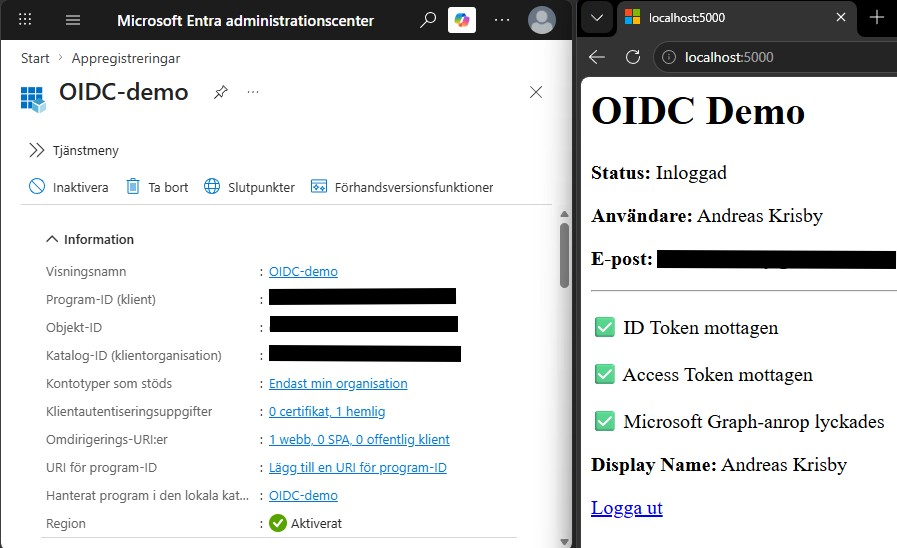
A new application registration was created in Microsoft Entra ID.
The application was configured with:
- Redirect URI
- Client ID
- Client Secret
When a user accesses the application, they are redirected to Microsoft Entra ID for authentication.
After successful authentication, Microsoft Entra ID returns an authorization code to the application.
The application then exchanges the authorization code for:
- An ID Token
- An Access Token
The ID Token is used to identify the user, while the Access Token is used to access protected resources.
The Access Token was then used to call Microsoft Graph and retrieve information about the signed-in user.
Key Learning Outcomes
OpenID Connect
Before this project I understood OIDC mostly as a concept.
After implementing the flow, it became much clearer that OpenID Connect is not an application or service itself, but a protocol used between the application and the identity provider.
The application delegates authentication to Microsoft Entra ID and receives an ID Token containing information about the authenticated user.
ID Token vs Access Token
The biggest takeaway from this project was understanding the difference between ID Tokens and Access Tokens.
ID Token
Used by the application to identify the user. Answers the question: Who is the user?
Examples of claims:
- Name
- User Principal Name
- Object ID
- Tenant ID
Access Token
Used when accessing protected APIs. Answers the question: What is the user allowed to do?
In this project the Access Token was used to access Microsoft Graph using the User.Read permission.
Microsoft Graph
Using the Access Token, the application successfully called:
GET https://graph.microsoft.com/v1.0/me
This returned information about the signed-in user and demonstrated how OAuth 2.0 is used to securely access APIs without exposing user credentials to the application.
Single Sign-On (SSO)
The project also helped demonstrate how Single Sign-On works.
Even after clearing the application’s local session, Microsoft Entra ID could still authenticate the user without requiring a new password because the identity provider session remained active.
This highlighted the difference between:
- Application sessions
- Identity provider sessions
Conclusion
This project helped bridge the gap between theory and practice.
By building a working OpenID Connect integration with Microsoft Entra ID, I gained a much better understanding of Authorization Code Flow, token-based authentication, Microsoft Graph and modern identity architecture.
The most valuable lesson was seeing the difference between authentication and authorization in a real implementation and understanding the distinct roles of ID Tokens and Access Tokens within the authentication flow.