End-to-End IAM: From HR to Entra ID with Elytra and Ascendra
Background
end-to-end-iam is a side project where I explore how a modern IAM landscape can be built. The project revolves around a fictional company, Legatus Corp, and consists of two separate systems.
- Elytra: an HR system that acts as the source of truth for employment data — meaning if any other part of the system disagrees with it, Elytra is the one that’s right.
- Ascendra: an IGA platform (Identity Governance & Administration) that handles identities, roles, provisioning, SSO connections, and audit.
I set the direction for the project: that the systems should be fully separate, that Convex would be the platform, and that the IGA system should connect to a real Entra ID tenant. Convex is a backend platform that bundles a database, server functions, and real-time updates into one thing, which made it a good fit for two standalone systems that still need to react quickly to each other’s events. I set up the app registration, the permissions, and the client secret (a secret key the app uses to authenticate itself) in Entra ID myself. The code implementation was built with AI-assisted development.
It’s the same problem every organization with more than a handful of employees has to solve. When someone joins, the right accounts need to be created automatically. When someone changes role, access needs to be updated. When someone leaves, access needs to disappear quickly and safely. That’s exactly what the Joiner-Mover-Leaver flow (JML) this project models.
Initially, the connection to the identity provider was fully simulated. “Test connection” just wrote a line to the audit log regardless of what was actually configured. No Entra ID, no Graph calls, and no real provisioning. I wanted to see how the solution would hold up against a real directory.
Demo
What I Built
Architecture
Elytra and Ascendra are deliberately fully separate systems.
- Separate Convex deployments
- No shared database
- No direct communication between the systems
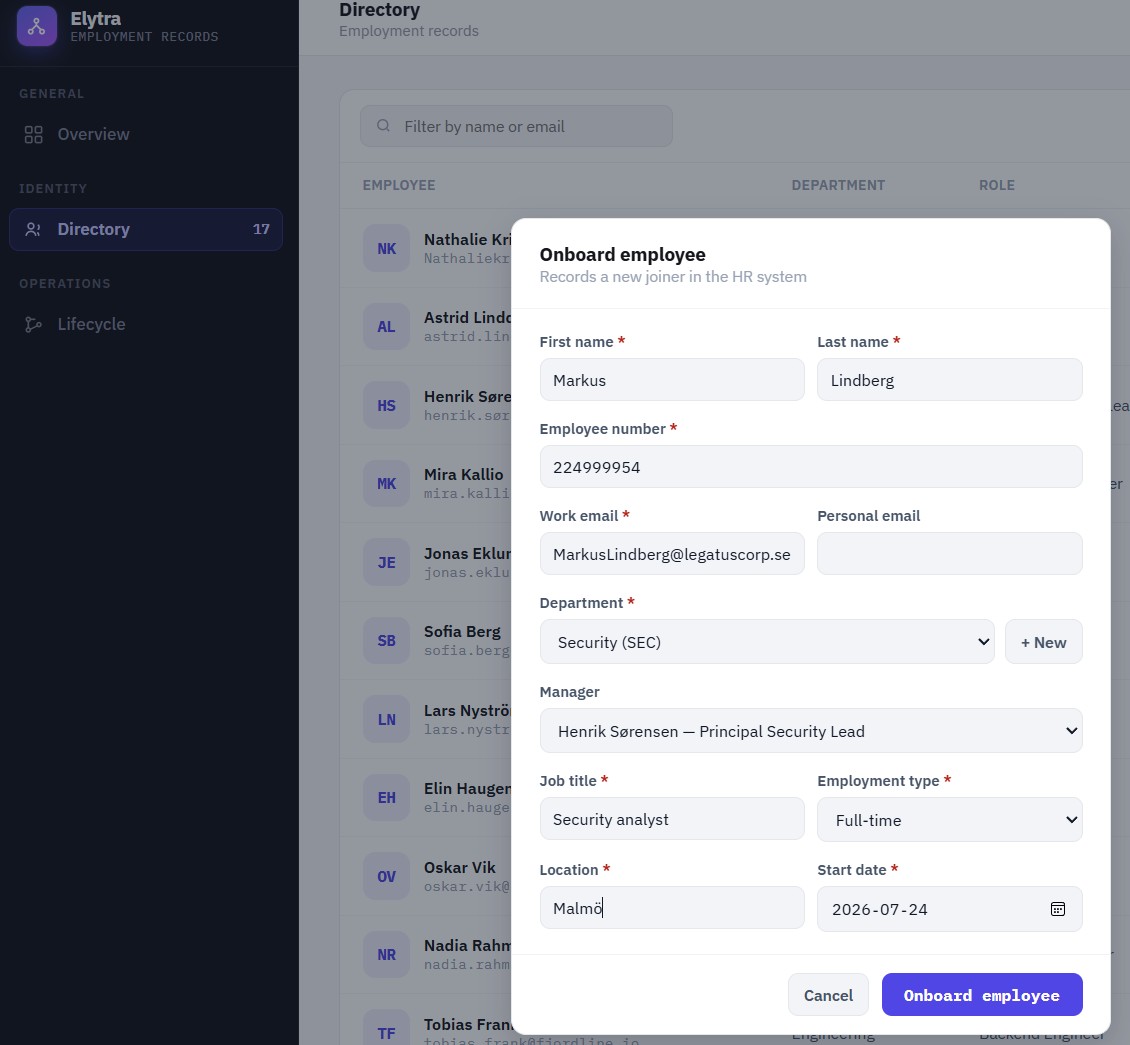
The only connection is an append-only outbox. Elytra publishes:
employee.createdemployee.updatedemployee.activatedemployee.terminated
Ascendra regularly reads the event log (it polls it) and keeps track of where it last left off using a cursor — a marker pointing at the last event it has already fetched. The next time Ascendra reads the log, it only pulls what’s been added since then, instead of re-reading everything from the start. From these events, it builds up its own identity model. From what I’ve read, this is a simplified version of a pattern larger organizations use to keep HR and their IGA platform separate.
Provisioning to Entra ID
What was missing was the next step. I didn’t just want to create identities inside Ascendra — I wanted to actually create, update, and disable real users in Entra ID.
My first thought was SCIM. That turned out to be the wrong path. When Entra ID is the target directory, there’s no inbound SCIM endpoint to provision against. SCIM is instead used by Entra when it provisions users onward to other SaaS services.
The correct solution turned out to be Microsoft Graph. Microsoft Graph is Microsoft’s API for Entra ID and the rest of Microsoft 365: an interface other programs talk to in order to read and change data — for example, to create a user or disable an account. I refer to each such request as a Graph call.
Ascendra talks to Microsoft Graph using application permissions and the Client Credentials flow, a way for programs to authenticate with each other without a human logging in. The app registration in Entra ID uses:
- Single Tenant: the app can only be used against our own Entra ID tenant, not by other organizations.
- No Redirect URI: only needed for interactive sign-in, which doesn’t apply here.
User.ReadWrite.All: permission to read and write every user account in the tenant.Organization.Read.All: permission to read organization info, such as verified domains.- Application Permissions: permissions that belong to the app itself, not to a signed-in person. They apply at all times, regardless of who — if anyone — is running the code.
- Admin Consent: an administrator has to approve the permissions before the app is allowed to use them.
- Client Secret: a secret key the app uses to prove its identity to Entra ID.
What I Tested
- Verification against a real Entra tenant via Microsoft Graph
- Automatic onboarding
- Updating users
- Offboarding
- Retry of failed provisioning attempts (an automatic new attempt after a failed Graph call, e.g. a transient network error)
- Manual resync (a button that forces a fresh sync of an identity against Entra ID — see the explanation under Challenges below)
- Periodic reconciliation between HR and Entra (a regular comparison pass that checks the two systems against each other and corrects any drift, e.g. if an event was ever dropped)
Results
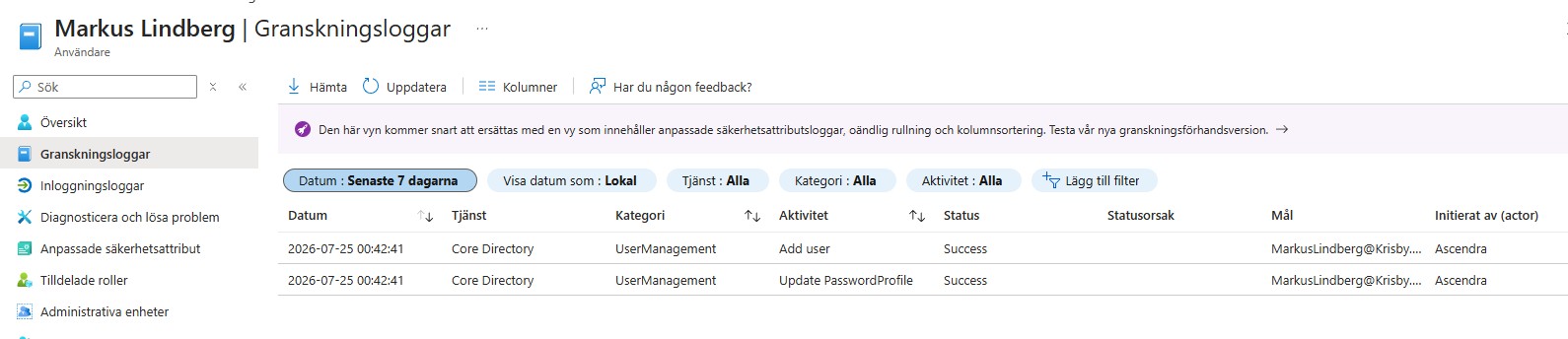
Provisioning is now real all the way through. When an HR event is created in Elytra, it materializes in Ascendra, which then creates, updates, or disables a real account in Entra ID.
In addition to the event-driven provisioning, there is also:
- Reconciliation every 15 minutes
- Retry of failed Graph calls
- SLA warnings if onboarding or offboarding takes too long
Auth0 and the generic SCIM integration are still simulated, since they weren’t needed for this particular part of the project.
Challenges
Things only got interesting once the integration became real.
Resync re-enabled a terminated user
Resync is a button in Ascendra that manually forces a new sync against Entra ID — for example if a previous sync failed. It doesn’t read anything new from the HR system; it takes what Ascendra already knows about the identity and sends it to Entra again via Graph.
The most serious bug: the code behind Resync always sent accountEnabled = true to Graph, regardless of whether the person was still employed. Concretely, this is what happened: an employee was terminated, and the account was correctly disabled in Entra. I clicked Resync again on the same person, just to test it, and the account was re-enabled in Entra — even though the HR system still showed the person as terminated.
The fix was to always derive accountEnabled from the HR system’s current employment status, no matter which function makes the Graph call. This was a bug that could have restored a former employee’s access with nothing more than a single extra button click.
UPN and email are not the same thing
My tenant only had its default domain verified. The fix was to use the tenant’s verified domain for userPrincipalName, while keeping the user’s real email address in mail. From what I understand, this split between sign-in name and email is common in real setups too.
Other issues
- Test Connection gave no feedback in the UI
- The SSO page was empty because the table was never populated with test data
- Failed Entra syncs disappeared from the lifecycle view instead of showing up as errors
Reflection
This project taught me one thing above all else. As long as an integration is simulated, it’s easy to believe everything works. It’s only once it’s connected to a real system that the real problems surface. That’s also when the project started to feel like an actual IAM system instead of a demo.
Technical Note
AI was used to build most of the code implementation. My focus was on the direction and the IAM concepts behind the solution: separating HR from IGA, connecting an IGA system to a real Entra ID tenant, setting up the app registration, permissions, and secret in Entra ID, and testing the flow hard enough to find bugs like the Resync issue above.